Email is still one of the strongest channels for marketing and business growth. The Wall Street Journal calls email “the only guaranteed-delivery option the internet has left.”
Advertising is expensive. Social reach may change overnight. SEO results can rise or fall without warning. But an email list is something you own. It enables you to control how and when you communicate.
That’s why building a safe email acquisition funnel matters. Bad or fake emails hurt you at multiple levels. They can damage deliverability. They can lower sender reputation. And yes, they will reduce revenue. A clean list starts at the entry point, when a user first submits their email.
In this guide, we explain the 7 simple steps to capture only valid, real, and safe-to-send email addresses. Follow them properly and soon you’ll have a list that connects, engages, and buys from you.
Come, let’s start building growth!
What is a safe email acquisition funnel?
A safe email acquisition funnel is a channel from where you collect deliverable, consented email addresses.
In the definition of a safe email acquisition channel above, notice two words: deliverable and consented. Here’s what it means:
- Deliverable: The email addresses should be safe-to-send. In other words, if you send emails to those addresses, your emails will most likely land in the inbox. The probability that they will bounce is almost zero. It’s because the real-time email verification solution in your acquisition funnel validates every single email before adding it to your list.
- Consented: This means the owner of the email address has provided you clear consent to send them emails. It also comes with an implicit trust that you won’t abuse, share, or sell those emails.
Why bad emails enter your system in the first place
Bad emails enter your system by mistake as well as by design. People commit typos. So, the email that should have been, for instance, robert@email ends up as rpbert@email in your email list.
In other cases, users intentionally enter a fake or disposable address to access gated content. That’s done mostly because they suspect the organization might resell or abuse their email.
Either way, you’ll see a number of invalid or disposable, low-quality email addresses on your list.
Over time, such email addresses reduce list quality, lower engagement, and damage your sender reputation.
How an automated filtering funnel solves this
A safe email acquisition funnel adds verification checkpoints at every stage. In case of a typo, the system will suggest a correct alternative whenever feasible (‘Did you mean amy.chan @ gmail . com instead of amy.chan @ gmial . com?’).
This real-time email verification system will reject disposable emails. It can also flash a message, “Please submit a valid email address.”. The system will flag risky email addresses for review. In short, automation does the heavy lifting. Subsequently, only clean, qualified emails enter your email list.
Why the safe channel matters
Emails can boost revenue and help drive growth.
If you aren’t using emails, you are ignoring a high-ROI channel. Even not monitoring the email list quality hurts.
Organizations lose an estimated 15% of their annual revenue (an average of about $12.9M) due to poor quality of contacts.
Source: Landbase
Now you know why a safe email list-building channel is so important.
Here are the 7 steps to build an email acquisition channel that enables you to collect valid, relevant, addresses:
Step 1: Start with relevant, high-quality traffic sources
Your email list quality is only as strong as your traffic source. Traffic source not relevant? You may still collect valid emails, but conversion rates stay low.
So the first step is to improve where your leads come from. A high-quality source improves your list, reduces risky addresses, and brings in email contacts that are more relevant to your business.
Channels that produce clean data
Organic channels usually deliver the best data quality.
Genuinely interested users come through:
- website sign-ups,
- content downloads,
- webinars,
- product trials, and
- referral programs
These visitors invest time to learn about your product, which lowers the chance of fake or disposable emails.
If you’re planning to use paid channels, here are some options to collect reliable submissions:
- paid channels, built with thoughtful targeting,
- niche search ads,
- intent-led platforms, and
- retargeting campaigns
Channels that usually generate risky emails
Irrelevant traffic often leads to risky email submissions. For example, if you sell industrial fasteners, promoting content on pages about food recipes will bring poor-quality leads.
Here are some of the likely channels that bring low-quality emails:
- Broad giveaways,
- contests,
- coupon-based campaigns,
- influencer broad shoutouts, and
- poorly targeted ads that attract users who want the reward, not the product
Such users are more likely to enter disposable or fake emails. Recognizing these patterns helps marketers build the right verification steps for high-risk traffic.
Step 2: Build smarter signup and lead capture forms
Many marketers see signup forms as simple collection tools. But forms play a major role in protecting email data. A smart form reduces friction for genuine users and blocks low-quality submissions early. That helps you maintain a clean list.
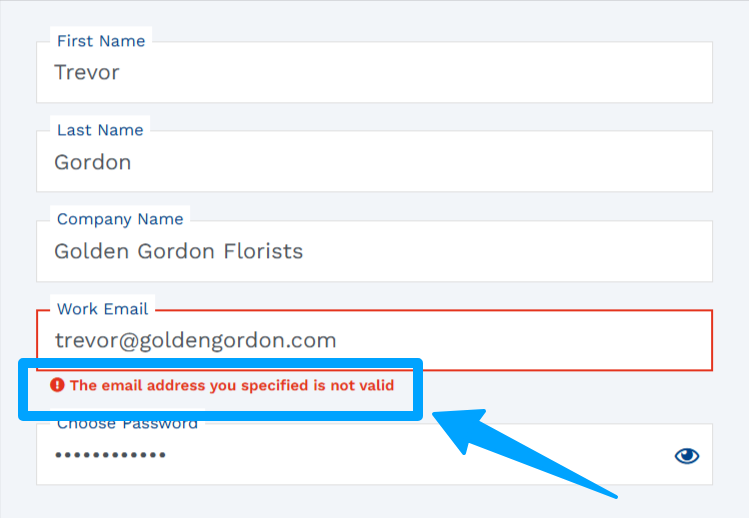
Use real-time email verification
Real-time verification is your first safeguard. As soon as a user submits an email, the system checks whether it’s valid, deliverable, and safe to send.
This stops risky emails from entering your ESP and prevent subsequent hard-bounce. Only verified emails will move to the next stage.
Add typo detection and suggestion prompts
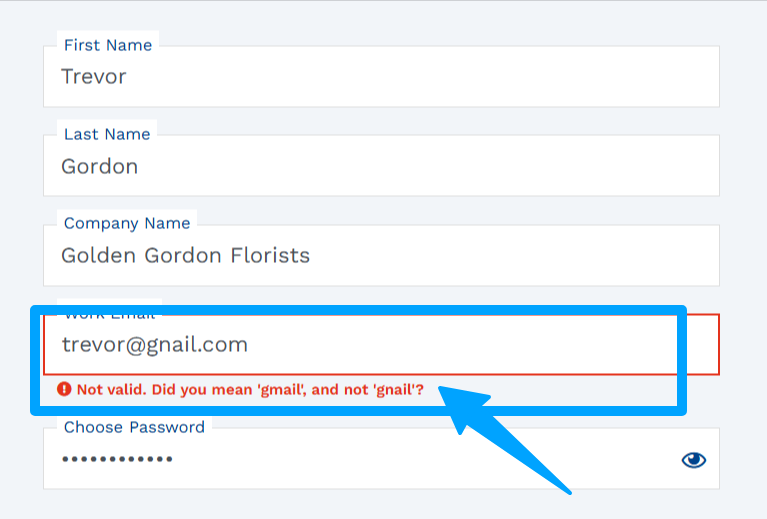
Typos are surprisingly common. Someone types gmial instead of gmail, or yaho instead of yahoo. Without intervention, these small errors degrade your list over time.
Smart forms catch these slip-ups and suggest corrections on the spot. Something as simple as “Did you ‘gmail’, and not ‘gnail’?” can recover a lead that would have otherwise bounced.
Block disposable and temporary emails instantly
Some users enter throwaway addresses to access gated content. Such emails hurt engagement and damage segmentation. Your form should reject such domains and request a valid email instead.
Forms can’t achieve this on their own. You need the right real-time email validation tool to fend off the bad quality of emails from your form.
Step 3: Have verification at every entry point
Protecting your sign-up form is essential but not enough. You need to pay attention to all other entry points where subscribers are likely to submit their emails.
If your organization is like other organizations, it collects emails from multiple sources. And in order to do this smoothly and securely, you need to mitigate the risks at every touchpoint.
A single unchecked entry point can introduce hundreds of bad addresses into your system. That’s why verification needs to be active wherever emails enter your ecosystem.

Landing pages
Landing pages are built to attract high-intent users. But will they attract bots or bulk submissions? Yes, especially if the page is promoted heavily.
Adding verification here ensures that every email is checked before it’s accepted. Whether the visitor is signing up for a trial, a demo, or a newsletter, real-time email verification ensures that only valid and safe-to-send emails get a green signal.
Lead magnets and gated content
Do you use reports, templates, checklists, and ebooks to bring large volumes of leads in a short time? Then you probably know that they can also be magnets for disposable or fake emails.
You want to grant access to your gated content only to users who are willing to share their valid emails. So have real-time verification in place – that way, the user will still get the content but only after submitting a real, usable email address. And you can do this without ruining user experience.
Sales outreach lists and manual imports
Sales teams regularly add emails from events, webinars, one-to-one meetings, and so on. These sources can be riskier than the others, because manual entries hugely increase the risk of typos.
Run verification before importing these contacts. Using a strong email checker prevents bounces, protects domain reputation, and ensures sales emails reach real prospects instead of harming sender credibility.
Step 4: Automate filtering inside your CRM/ESP
Once emails enter your CRM or ESP, you’ll need automation to make the email verification system your second line of defense. Manual checks cannot scale, especially when multiple teams add contacts through workflows, integrations, or direct imports.
Automated filtering ensures that your database stays clean even when new entries come in from all directions.
Set rules to reject invalid or risky emails
Most CRMs and ESPs allow you to create basic rules or validation checks. These rules can automatically block known invalid formats, reject addresses from suspicious domains, and stop submissions that fail verification.
Instead of letting problematic data slip through and harm your campaigns later, the CRM quietly prevents it from entering the system in the first place.
Auto-tag catch-all, role, and low-quality emails
Some emails, even though deliverable, require caution. Catch-all domains, role-based addresses (like info@ or support@), and low-quality sources should be tagged the moment they enter your CRM.
Tagging helps your marketing and sales teams decide how to handle these contacts – whether to nurture them gently, validate them again, or exclude them from campaigns.
Knowing how to manage the risks of catch-all, disposable, or role addresses is crucial to getting more out of your campaigns even while you prune your email lists.
Trigger cleanup workflows
Modern platforms like HubSpot and Salesforce allow automated workflows that handle cleanup behind the scenes. You can automatically re-verify older contacts. Based on the results, you can quarantine doubtful emails and discard invalid ones.
These workflows ensure ongoing data hygiene. You can reduce manual effort and keep your sender reputation safe, no matter how large your database grows.

Step 5: Segment your leads before sending
Different campaigns have different risk appetites. The nature of the campaign plays a significant role in deciding whether the marketer wants to cast their net wide or just play safe. Treating all email contacts equally in all situations is where many brands lose deliverability momentum.
Before you hit “Send”, you might want to score and segment your leads so that the right message reaches the right type of address.
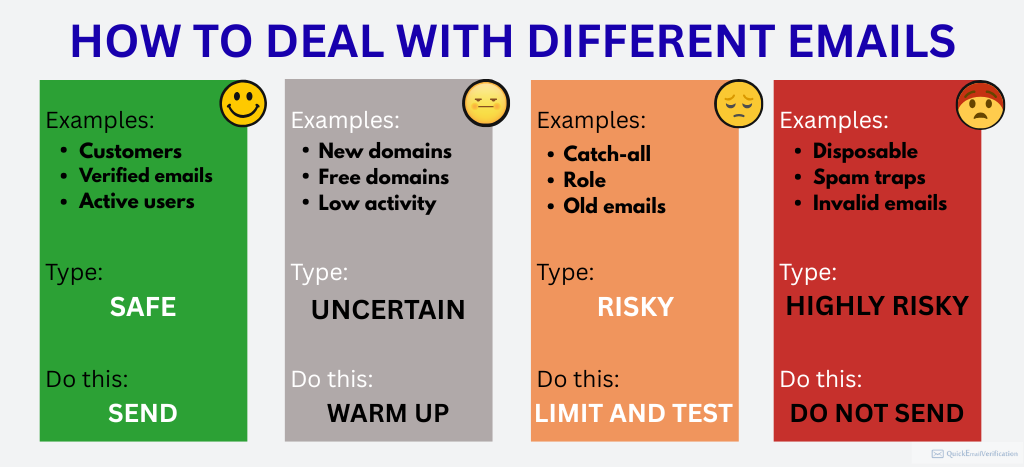
Create risk categories (safe, uncertain, risky)
Lead scoring doesn’t only apply to intent; it applies to email quality as well.
Safe leads mean:
- clean and verified email addresses, and
- active and recently engaged addresses
Uncertain leads are:
- catch-all domains,
- older addresses who haven’t been contacted recently, and
- emails acquired from less predictable channels
Risky leads may include:
- role accounts, and
- Email addresses entered manually (by typing) and yet not verified or contacted
Highly risky emails include:
- email addresses from disposable domains, and
- addresses previously associated with hard bounces
Creating these categories helps you control how aggressively you email each group, and it reduces the chances of sudden deliverability drops.
Dealing with emails with different types of risks
Here’s a table that shows how to deal with risky emails:
| Type of email | Recommended action |
| Highly risky: Disposable email | Discard these emails. |
| Highly risky: Previously hard bounced and no subsequent engagement | Discard these emails. |
| Risky: Previously hard bounced, then had engagement for a brief period, after which you haven’t emailed them for some time | This is the rarest category. Send one re-engagement email asking them to confirm their subscription. — Discard if that email bounces — Suppress if neither engages nor bounces — Move to regular list if they confirm subscription |
| Risky: Role accounts | Put them in a re-engagement email sequence, asking them to confirm their subscription. If the number of emails is more than 2% of your email list, consider asking them for a double opt-in. |
| Risky: Emails entered manually and not verified after that | Step 1: Verify those email addresses. Step 2: Based on the email verification results, discard emails that fall under the Highly Risky category or are Invalid emails. For valid emails, follow Step 3. Step 3: Send them a re-engagement email asking them to confirm their subscription. |
| Uncertain leads: Catch-all email domains | Warm them up. Send emails slowly and then increase the frequency and bring them at par with other Safe-to-Send emails. |
| Uncertain leads: Older addresses with no recent contact | Step 1: Verify those email addresses. Step 2: Discard emails that fall under the Highly Risky category or are Invalid emails. For valid emails, follow step 3. Step 3: To valid emails, send a re-engagement email asking them to confirm their subscription |
| Safe leads | Continue sending legitimate, regular emails. |
This approach ensures your strongest campaigns always reach your strongest contacts.
Step 6: Run a re-verification layer before campaigns
People switch jobs, abandon inboxes, change domains, or sign up with temporary addresses that expire without warning. Subsequently, their previous emails die.
An estimated 25% emails – one in every four -turn invalid every year.
The National Library of Medicine
In fact, most estimates place the email decay rate between 20% and 30% every year. That’s why adding a re-verification layer before major campaigns is essential.
Why this prevents last-minute bounce issues
Re-verification catches addresses that have quietly turned invalid since your last cleanup. Without it, you risk sudden spikes in hard bounces. That can damage sender reputation in a single campaign. ESPs tend to interpret unexpected bounce surges as a sign of poor list management. Hence, you will likely see reduced inbox placement immediately after.
A simple re-verification pass prevents these surprises and protects the goodwill you’ve built with mailbox providers.
When to re-verify old or cold leads
Here’s how to manage the quality of emails from outside your main funnel.
Regularly clean the lists you have:
- collected from events.
- built from tradeshow scans,
- combined from uploaded spreadsheets, or
- generated from data sources outside your main funnel
Before seasonal sends (like Black Friday) or high-volume announcements, follow a simple step. Go for a fresh verification sweep to ensure you’re emailing real, active inboxes, and not outdated or risky addresses.
Consider re-verification of your list in at least two scenarios:
- You haven’t sent a campaign to that list in the past three months.
- You haven’t cleaned the list in the past 60 to 90 days, and your system doesn’t automatically remove bounces from the sending list.
Step 7: Monitor your the data health of your funnel
Imagine you have a machine that makes paper cups from the paper you feed it. Periodically, you’ll need to clean the machine, check the dials and knobs, test the wiring, oil some parts, … No matter how good the machine is, you won’t expect it to run forever, without any need for maintenance or repairs, right?
That’s pretty much the same with email lists.
You can’t build a safe email acquisition funnel once, and then assume that it’s good forever and forget it. Data quality constantly shifts as traffic sources change, campaigns go live, and user behavior evolves.
Monitoring your funnel’s health ensures you catch early warning signs before they escalate into deliverability problems. Think of it as routine maintenance: small checks that prevent big breakdowns later.
Bounce rate and complaint trends
Bounce rates are one of the clearest signals of data quality. A sudden increase usually indicates that invalid, expired, or poorly captured emails have entered your system.
Monitoring both hard and soft bounces helps you identify patterns quickly. Complaints matter just as much. If spam complaints start to rise (even slightly) mailbox providers may throttle your inbox placement, or even suspend your account, temporarily or permanently.
Complaints often spike when low-interest or low-quality contacts slip into campaigns. Tracking these two metrics together gives you a reliable view of how engaged your list truly is.
Identifying acquisition sources creating bad data
Not all traffic sources perform equally. Some channels consistently deliver engaged, high-quality subscribers, while others quietly pollute your email list. So you want to review each acquisition pathway, i.e., landing pages, social ads, webinars, lead magnets, and event imports.
Find which channels produce higher bounce rates or lower engagement. When a source repeatedly contributes bad data, tighten verification on that channel, refine the audience targeting, or remove it entirely. Over time, this source-level insight shapes a stronger, more predictable email acquisition ecosystem.
Final takeaway: Clean leads = safe sending
An effective email campaign doesn’t start when you hit “Send.” It starts much earlier – at the moment a lead enters your system. You need to protect every entry point. You want to make sure that every form is smart and verify every contact. That’s where you take the most important step of improving your email deliverability.
When your acquisition process consistently filters out bad data, your campaigns reach real people. Then, your engagement rises naturally, and your domain stays protected. In email marketing, growth is simple: protect the top of your funnel, and the bottom-line will take care of itself.